如何给绘制的图形贴图(纹理贴图)?

图片采样

在进行屏幕上某一像素绘制的时候,根据像素位置,决定使用图片上某个像素颜色的过程即为采样

问题

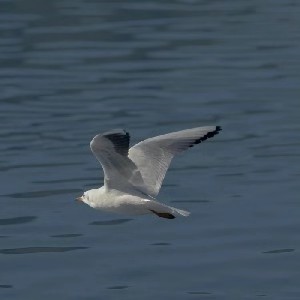
如果需要在屏幕上绘制一个固定大小的矩形,容纳所有不同大小的图片,如何做到?(图片的缩放如何通过采样实现)

思路

可通过像素对应图片当中的比例作为依据来进行采样,最后用长宽乘以比例得到具体的位置;由此提出UV坐标系统

UV坐标系统

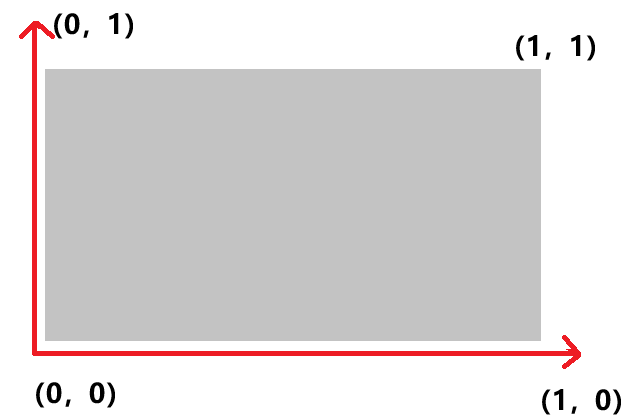
在图片上建立基于宽/高百分比的坐标系,分横(u)纵(v)坐标,图片左下角为(0,0),右上角为(1,1)

图-1

举例:采样图片宽高为 800×600
给到一组uv坐标(0.2,0.5)
计算具体横纵坐标:
800×0.2=160
600×0.5=300
最终采样位置为(160,300),如果像素位置为小数,则四舍五入

在遍历像素时,如何得到其对应的uv坐标?

图-2

通过重心插值算法就能够得到

代码实现

Raster.cpp


void Raster::rasterizeTriangle(
std::vector<Point>& results,
const Point& v0,
const Point& v1,
const Point& v2) {
int maxX = static_cast<int>(std::max(v0.x, std::max(v1.x, v2.x)));
int minX = static_cast<int>(std::min(v0.x, std::min(v1.x, v2.x)));
int maxY = static_cast<int>(std::max(v0.y, std::max(v1.y, v2.y)));
int minY = static_cast<int>(std::min(v0.y, std::min(v1.y, v2.y)));

math::vec2f pv0, pv1, pv2;
Point result;
for (int i = minX; i <= maxX; ++i) {
for (int j = minY; j <= maxY; ++j) {
pv0 = math::vec2f(v0.x - i, v0.y - j);
pv1 = math::vec2f(v1.x - i, v1.y - j);
pv2 = math::vec2f(v2.x - i, v2.y - j);

auto cross1 = math::cross(pv0, pv1);
auto cross2 = math::cross(pv1, pv2);
auto cross3 = math::cross(pv2, pv0);

bool negativeAll = cross1 < 0 && cross2 < 0 && cross3 < 0;
bool positiveAll = cross1 > 0 && cross2 > 0 && cross3 > 0;

if (negativeAll || positiveAll) {
result.x = i;
result.y = j;
interpolantTriangle(v0, v1, v2, result);//插值算法

results.push_back(result);
}
}
}
}

void Raster::interpolantTriangle(const Point& v0, const Point& v1, const Point& v2, Point& p) {
auto e1 = math::vec2f(v1.x - v0.x, v1.y - v0.y);
auto e2 = math::vec2f(v2.x - v0.x, v2.y - v0.y);
float sumArea = std::abs(math::cross(e1, e2));

auto pv0 = math::vec2f(v0.x - p.x, v0.y - p.y);
auto pv1 = math::vec2f(v1.x - p.x, v1.y - p.y);
auto pv2 = math::vec2f(v2.x - p.x, v2.y - p.y);
//计算v0的权重

float v0Area = std::abs(math::cross(pv1, pv2));
float v1Area = std::abs(math::cross(pv0, pv2));
float v2Area = std::abs(math::cross(pv0, pv1));

float weight0 = v0Area / sumArea;
float weight1 = v1Area / sumArea;
float weight2 = v2Area / sumArea;

//对于颜色的插值
p.color = lerpRGBA(v0.color, v1.color, v2.color, weight0, weight1, weight2);

//对于uv坐标的插值
p.uv = lerpUV(v0.uv, v1.uv, v2.uv, weight0, weight1, weight2);
}

RGBA Raster::lerpRGBA(const RGBA& c0, const RGBA& c1, const RGBA& c2, float weight0, float weight1, float weight2) {
RGBA result;

result.mR = static_cast<float>(c0.mR) * weight0 + static_cast<float>(c1.mR) * weight1 + static_cast<float>(c2.mR) * weight2;
result.mG = static_cast<float>(c0.mG) * weight0 + static_cast<float>(c1.mG) * weight1 + static_cast<float>(c2.mG) * weight2;
result.mB = static_cast<float>(c0.mB) * weight0 + static_cast<float>(c1.mB) * weight1 + static_cast<float>(c2.mB) * weight2;
result.mA = static_cast<float>(c0.mA) * weight0 + static_cast<float>(c1.mA) * weight1 + static_cast<float>(c2.mA) * weight2;

return result;
}

//计算uv,给定的三个点的uv乘以对应的权重得到当前像素对应的uv值
math::vec2f Raster::lerpUV(const math::vec2f& uv0, const math::vec2f& uv1, const math::vec2f& uv2, float weight0, float weight1, float weight2) {
math::vec2f uv;

uv = uv0 * weight0 + uv1 * weight1 + uv2 * weight2;
return uv;
}

GPU.cpp

void GPU::setTexture(Image* image) {
mImage = image;
}

void GPU::drawTriangle(const Point& p1, const Point& p2, const Point& p3) {
std::vector<Point> pixels;
Raster::rasterizeTriangle(pixels, p1, p2, p3);

RGBA resultColor;
for (auto &p : pixels) {
if (mImage) {
resultColor = sampleNearest(p.uv);
}
else {
resultColor = p.color;
}

drawPoint(p.x, p.y, resultColor);
}
}

RGBA GPU::sampleNearest(const math::vec2f& uv) {
auto myUV = uv;

//四舍五入到最近整数
// u = 0 对应 x = 0,u = 1 对应 x = width - 1
// v = 0 对应 y = 0,v = 1 对应 y = height - 1
int x = std::round(myUV.x * (mImage->mWidth - 1));//从0开始,所以需要-1
int y = std::round(myUV.y * (mImage->mHeight - 1));

int position = y * mImage->mWidth + x;
return mImage->mData[position];
}

Image.cpp

#define STB_IMAGE_IMPLEMENTATION
#include"stb_image.h"
#include "image.h"

Image::Image(const uint32_t& width, const uint32_t& height, RGBA* data) {
mWidth = width;
mHeight = height;
if (data) {
mData = new RGBA[mWidth * mHeight];
memcpy(mData, data, sizeof(RGBA) * mWidth * mHeight);
}
}

Image::~Image() {
if (mData != nullptr) {
delete[] mData;
}
}

Image* Image::createImage(const std::string& path) {
int picType = 0;
int width{ 0 }, height{ 0 };

//stbimage读入的图片,原点在左上角,y轴是向下生长的
//我方图形程序认为,图片应该是左下角为0,0;故需要翻转y轴
stbi_set_flip_vertically_on_load(true);

//由于我们是BGRA的格式,图片是RGBA的格式,所以得交换下R&B
unsigned char* bits = stbi_load(path.c_str(), &width, &height, &picType, STBI_rgb_alpha);
for (int i = 0; i < width * height * 4; i += 4)
{
byte tmp = bits[i];
bits[i] = bits[i + 2];
bits[i + 2] = tmp;
}

Image* image = new Image(width, height, (RGBA*)bits);

stbi_image_free(bits);

return image;

}

void Image::destroyImage(Image* image) {
if (image) {
delete image;
}
}

main.cpp

struct Point {
int32_t x;
int32_t y;
RGBA color;
math::vec2f uv;
};

Image* texture;
Point p1;
Point p2;
Point p3;

void render() {
sgl->clear();
sgl->setTexture(texture);
sgl->drawTriangle(p1, p2, p3);
}

void prepare() {
texture = Image::createImage("image/test.jpg");

p1.x = 0;
p1.y = 0;
p1.color = RGBA(255, 0, 0, 255);
p1.uv = math::vec2f(0.0f, 0.0f);

p2.x = 400;
p2.y = 900;
p2.color = RGBA(0, 255, 0, 255);
p2.uv = math::vec2f(0.5f, 1.0f);

p3.x = 800;
p3.y = 0;
p3.color = RGBA(0, 0, 255, 255);
p3.uv = math::vec2f(1.0f, 0.0f);
}

int APIENTRY wWinMain(
_In_ HINSTANCE hInstance, //本应用程序实例句柄,唯一指代当前程序
_In_opt_ HINSTANCE hPrevInstance, //本程序前一个实例,一般是null
_In_ LPWSTR lpCmdLine, //应用程序运行参数
_In_ int nCmdShow) //窗口如何显示(最大化、最小化、隐藏),不需理会
{
if (!app->initApplication(hInstance, 1024, 960)) {
return -1;
}

//将bmp指向的内存配置到sgl当中
sgl->initSurface(app->getWidth(), app->getHeight(), app->getCanvas());

prepare();

bool alive = true;
while (alive) {
alive = app->peekMessage();
render();
app->show();
}

Image::destroyImage(texture);

return 0;
}